
Viewer window · 12
Quality, speed and codecs
Windows viewer
Adjust quality and target FPS to suit the network and devices, and choose the codec in Settings.
Step by step
- In the viewer’s ⋯ Settings menu, select Quality and choose a bitrate level.
- In Frame rate, choose a target of 20, 30, 45 or 60 FPS.
- Choose the codec (H.265, H.264 or X264) in the main screen’s Settings > General > Codec. It applies when you control another device.
| Item | Meaning |
|---|---|
| Quality | Low 3 / Medium 5 / High 8 / Best 12 Mbps |
| Frame rate | 20 / 30 / 45 / 60 FPS |
| Codec | Settings > General: H.265 / H.264 / X264; encoder and decoder AUTO / HW / SW |
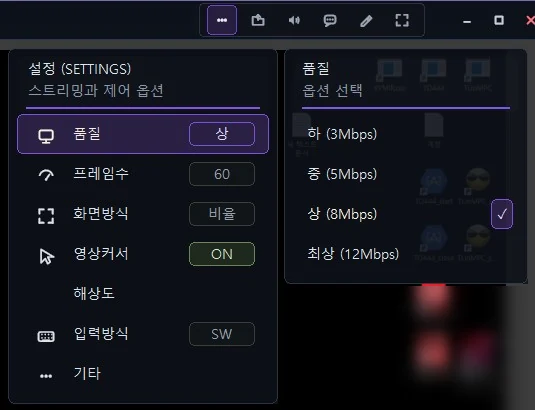
- 1 Quality options: Low 3 / Medium 5 / High 8 / Best 12 Mbps
- 2 Current choice (✓)
- 3 Frame rate (target FPS)
Numbers are explanatory overlays and do not appear in the application.