
Connecting · 06
Connect by access number
Windows · Mac · Android · iPhone
Request a connection with the 9-digit access number the other person gives you.
Step by step
- The other person (host) runs RemoteAll Desk and tells you the 9-digit number.
- In the viewer, enter the number in Connect to another PC and select Connect.
- When the host approves or the password or OTP is accepted, the remote screen opens.
| Item | Meaning |
|---|---|
| 9-digit number | Identifies the target device |
| Connection request | Starts the access procedure |
| Approval or authentication | Approval or password, depending on the host’s settings |
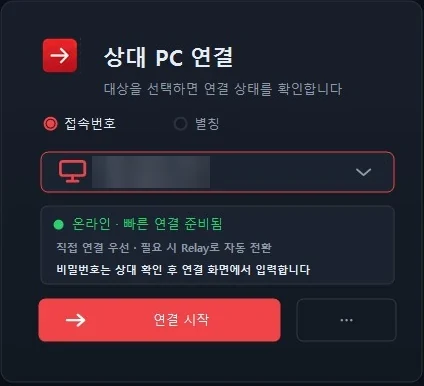
- 1 Access number / alias
- 2 Enter the other device's access number
- 3 Target status (online or offline)
- 4 Start connection
- 5 More connection options
Numbers are explanatory overlays and do not appear in the application.